 Invantive Cloud
My Profile |
Some functions of Invantive Cloud are unavailable till a user completes the profile.
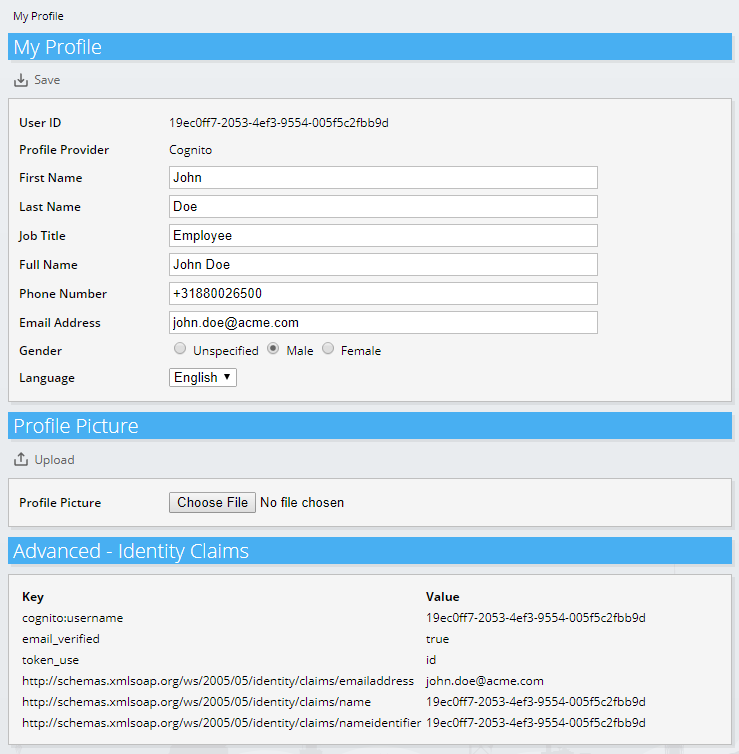
Buttons
The following buttons are used:
•Save: save changes in the My Profile section.
•Upload: upload the file with a profile picture.
Fields
The following fields are used:
•User ID: a unique ID of the user.
•Profile Provider: the technology used to authenticate the user.
•First Name: first name.
•Last Name: last name.
•Job Title: job title, used for pre-authentication.
•Full Name: the full name.
•Phone Number: phone number of the user.
•Email Address: email address used for communication.
•Gender: gender.
•Language: preferred communication language of the user, including the Invantive Cloud user interface.
•Profile Picture: file to upload using the "Upload" button as picture for the user. Upload is only available when the profile provider does not itself provide a profile picture.