The following message appears when the account move line data is refreshed:
Error in the data source:
DataSource.Error:
OData:
Invalid JSON.
Unexpected end of input was found in JSON content.
Not all object and array scopes were closed...
Microsoft.Data.Mashup.ValueError.DataSourceKind = OData.
DataSourcePath = https://bridge-online.invantive.com/acme-odoo/odata4/Odoo.account.move_line@odo. .
The exception was raised by the IDataReader interface.
Please review the error message and Provider documentation for further information and corrective action.
We recommend scheduling the download for a different time. It is not unusual for cloud platforms to carry out maintenance work between 2 and 3 at night, during which time they are unavailable.
Invantive SQL zal een aantal pogingen wagen en bij aanhoudende niet-beschikbaarheid de oorspronkelijke getoonde foutmelding rapporteren.
This question was automatically closed after 1 week of inactivity. The last answer provided has been marked as the solution.
Please ask a new question in a separate thread if the problem reoccurs. Please include a link to this thread in the new question by pasting its URL into the text.
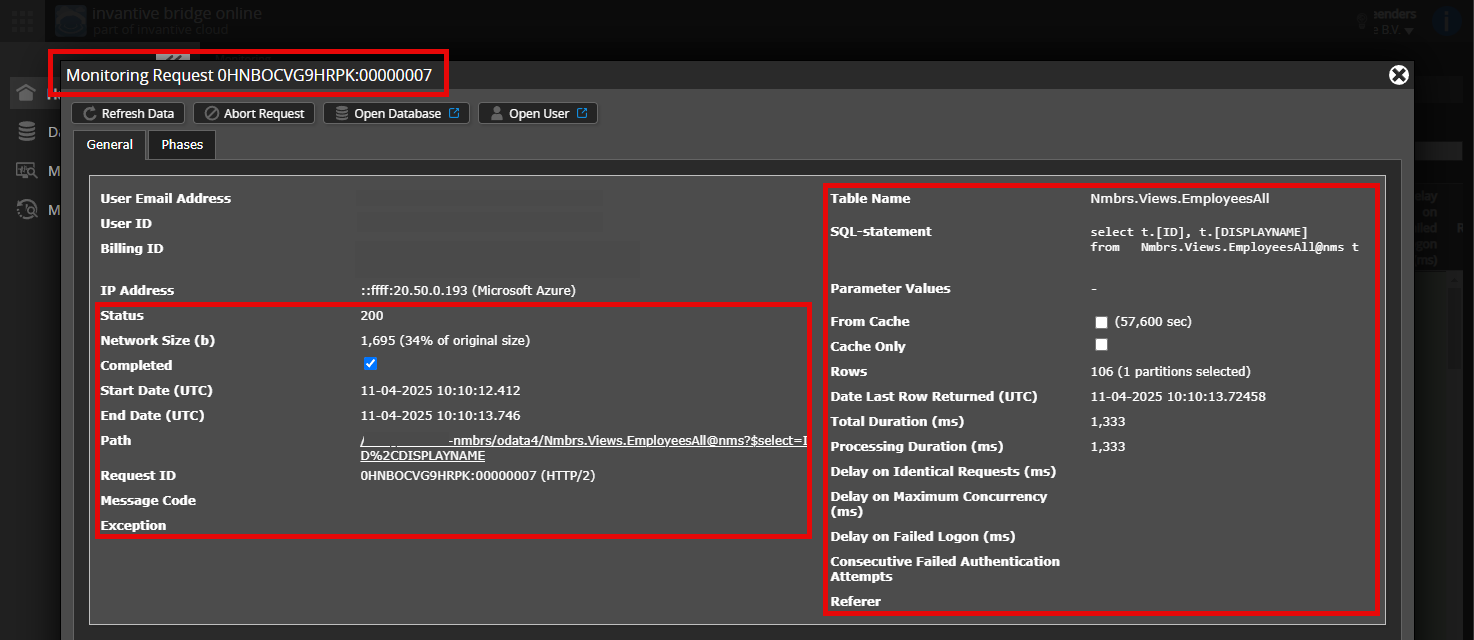
You can find the details by clicking on the download request that corresponds to the subject of this thread.
The download request usually contains an SQL statement in which the table name is visible.
Please ensure that at least the following details are visible in both columns:
the title bar containing the request ID,
the status code, network size, path and timestamps in the left-hand column,
the error code and error message at the very bottom of the left-hand column,
the entire right-hand column, including the SQL statement, table name and parameter values.
For example:
Check the correct server and user
Please ensure that you log in to the Bridge Online website that is also used from within Power BI, using the same username. You will only see the requests from the Invantive Cloud user with which you log in to the website.
There are four servers in use:
bridge-online.cloud
app-online.cloud
bridge-online.invantive.com
app-online.invantive.com
You can see the server used in your script or the Resource Code of your report.
Check the correct request and details
Make sure you select the request first to view the details. Only one request should be visible in the screenshot.
Also, please check carefully whether the request has a path containing odata4 or apps. Requests with different paths are generally not relevant for this purpose.
Error messages and tips by email
In addition, the Invantive Cloud user who received the error message will usually receive an email at their email address containing the error message and tips if an error occurs in Power BI, Power Query, Azure Data Factory, Qlik or Tableau.
We recommend checking the spam folder of the user concerned for any such emails sent from support@invantive.com.
Reply 4
22-08-2026 08:56 UTC
This is the full error message:
itgenoda359
The connection to the website has been unexpectedly and forcibly terminated for reasons such as insufficient permissions, the website crashing, the system restarting, an external host being forcibly shut down, or firewall action. 22 -08 -2026 02:41:30
Data retrieval failed for all 3 attempts over a period of 203 seconds.
Neem contact op met de API-ondersteuning van Odoo. (https://acme.odoo.com/jsonrpc).
The data could not be downloaded since the connection timed out before returning results (timeout 57.000 ms).
(https://acme.odoo.com/jsonrpc).
The operation has timed out.