Sinds kort gebruik ik ExactOnlineREST.Incremental.TransactionLinesIncremental@eol via Invantive Bridge Online (OData4) in Excel/Power BI. I expected that, after the first full load, only the delta would be retrieved and processed with each refresh: rows that had been modified or deleted since the last time. What I can see in the log differs from that. I wonder whether this is normal behaviour or whether something isn’t quite right.
Surroundings
Invantive Bridge Online 26.0.286
Administratie met circa 170.000 rijen voor de incremental tabel
HTTP disk cache 4 uur, Bridge response cache 15 minuten
What I see in IncrementalLoadEventLogEntries
Na de delta volgt bij vrijwel iedere verversing een reset op basis van de rijtelling: “Full reload of incremental cache … since the current cache row count … deviates too much from the calculated allowed minimum row count …”. This is followed by “Reconstructing. Do not reuse old data. "Full reload…".
With every refresh, it says "Timestamp moved from to " with empty values, and “No need to update incremental results since there was no previous version”.
A few times: “Can’t find all data files for the most recent download … Expecting 2 data files, found 0”.
Wat ik zie in de Sessie-I/O’s
The delta itself seems to be working well: sync/Financial/TransactionLines?$filter=Timestamp gt …L, with only the rows changed.
Daarna volgen echter circa 170 pagina’s van de volledige tabel. Zolang de disk cache geldig is komen die uit cache, maar een verversing duurt daardoor steeds 60 à 80 seconden.
De Deleted API wordt bij iedere verversing opgevraagd vanaf Timestamp gt 0L en gt 1L, elk 4 pagina’s. I had expected this one to start from the last timestamp seen as well.
Consecutive refreshes start with the same Timestamp gt …L value. It therefore appears that the timestamp does not shift following a delta, meaning that the delta keeps getting larger.
Als de disk cache verlopen is, wordt na de delta de volledige incremental tabel opnieuw bij Exact opgehaald (circa 220 werkelijke aanroepen, ruim 3 tot 8 minuten voor alleen deze tabel).
What strikes me Before the delta, the saved copy matches $count exactly. Na het verwerken van de ruim 3.000 verwijderde ID’s uit de Deleted API blijven er circa 3.000 rijen minder over. It appears that IDs which are reported as deleted still exist in Exact, and that this causes the row count check to trigger a full reload every time. But perhaps I’m misinterpreting this.
My questions
Is het normaal dat na iedere delta de complete tabel wordt gereconstrueerd?
Is het normaal dat de Deleted API steeds vanaf timestamp 0 wordt gelezen en dat de laatst geziene timestamp niet opschuift?
Is my hunch about the deleted IDs correct, or is there another explanation for the discrepancy in the row count?
This question was automatically closed after 1 week of inactivity. The last answer provided has been marked as the solution.
Please ask a new question in a separate thread if the problem reoccurs. Please include a link to this thread in the new question by pasting its URL into the text.
Reply 2
Invantive · 25-09-2026 20:38 UTC
It is not possible to fully understand the text, which may have been generated by AI.
In any case, a complete reboot is not normal behaviour. This only happens if the algorithm considers the dataset to be incomplete.
Deleting thousands of rows is also not common practice.
We recommend attaching a screenshot of a reload request such as the one described below.
Additional information
Is it possible to add an (anonymised) screenshot of the request details in Online Monitoring on Invantive Cloud, as described in Gain more insight with the new Monitoring?
You can find the details by clicking on the download request that corresponds to the subject of this thread.
The download request usually contains an SQL statement in which the table name is visible.
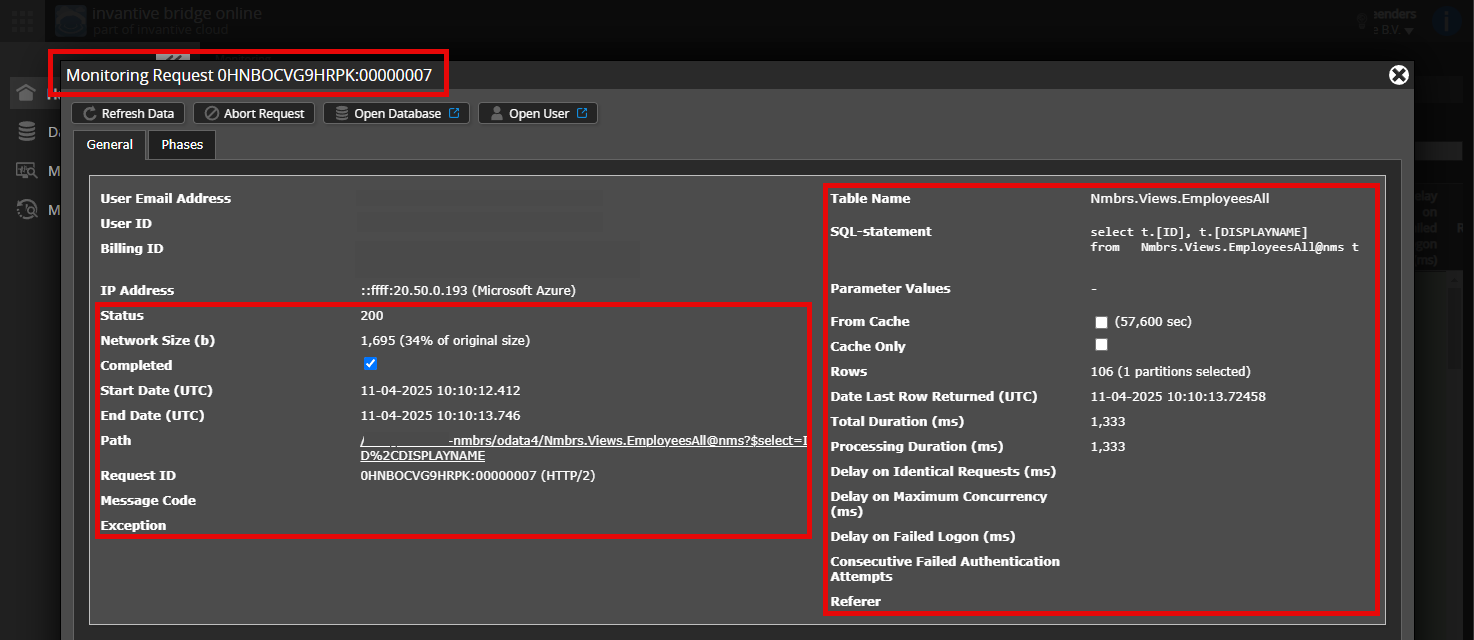
Please ensure that at least the following details are visible in both columns:
the title bar containing the request ID,
the status code, network size, path and timestamps in the left-hand column,
the error code and error message at the very bottom of the left-hand column,
the entire right-hand column, including the SQL statement, table name and parameter values.
For example:
Check the correct server and user
Please check carefully that you are logging in to the Invantive Cloud website using the same username as the one you use to process data via, for example, Invantive Bridge Online. You will only see the requests from the Invantive Cloud user with which you log in to the website.
Check the correct request and details
Make sure you select the request first to view the details. Only one request should be visible in the screenshot.
Also check carefully whether the request has a path containing odata4, apps or mcp. Requests with different paths are generally not relevant for this purpose.
Error messages and tips by email
In addition, the Invantive Cloud user who received the error message will usually receive an email at their email address containing the error message and tips if an error occurs in Power BI, Power Query, Azure Data Factory, Qlik or Tableau.
We recommend checking the spam folder of the user concerned for any such emails sent from support@invantive.eu.
Reply 3
29-09-2026 15:07 UTC
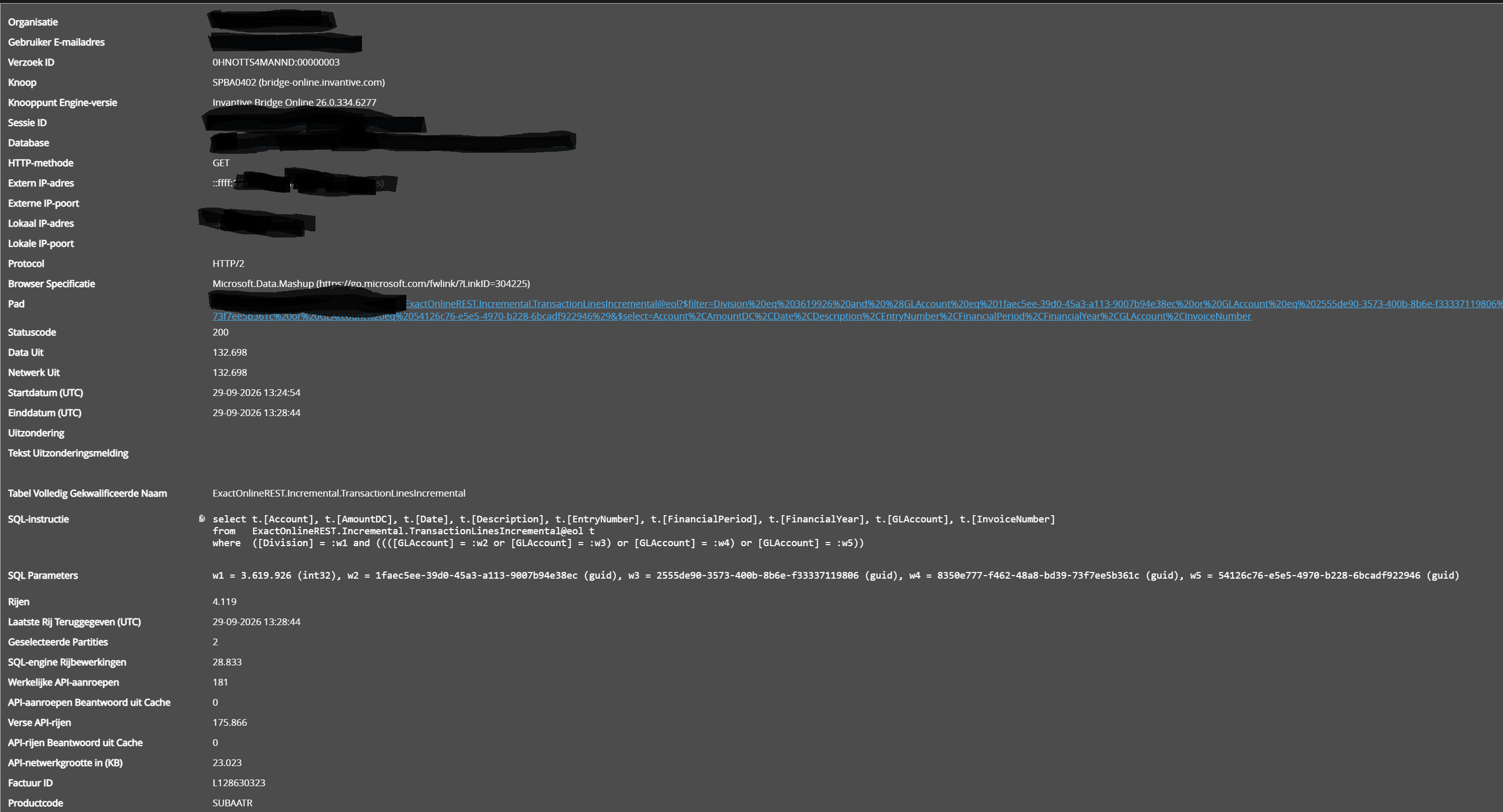
Request ID: 0HNOTTS4MANND:00000003
Here are the screenshots:
Query:
select ...
from   ExactOnlineREST.Incremental.TransactionLinesIncremental@eol
where  (Division = :w1 and ((([GLAccount = :w2 or [GLAccount] = :w3) or [GLOAccount] =:w4) or [GLAccount] = :w5))
Divisie: 3619926 Grootboekrekeningen: vier verschillende GUID’s Zichtbaar resultaat: 4119 rijen. Verwerkt: 175866 rijen vers opgehaald uit de Exact Online API, 0 beantwoord uit cache, met 181 API-aanroepen. Duration: 230 seconds. Geselecteerde partities: 2
Het herladen van deze cache wordt veroorzaakt door een protocolversie upgrade. De oude cache was opgebouwd conform protocolversie 7 onder release 26.0.286, terwijl de data werd opgehaald vanuit release 26.0.334.
The internal logging, which may also be reflected in the audit tables, records this as follows:
Found payload in unsupported HTTP disk cache format in file '/SOMEPATH/TransactionLinesIncremental/72070809c7b62ad341e7de06cb24e183.cache': protocol version 7 instead of 9, compressed True, encrypted True.
However, this is a one-off occurrence and cannot have happened before. The analysis shows that a bug also occurs when determining the “timestamp”. This behaviour is neither normal nor desirable.
A bug fix for this will be implemented in the upcoming release 27.0, and, if technically feasible, will also be included in release 26.0.