Project Transactions
- documentation
 Invantive Get My Report for Exact Online
- updated 09-08-2026 00:00 UTC
Purpose
Downloads an overview of hours, cost transactions, financial transactions and Work Breakdown Structure across a range of projects from one or more Exact Online companies.
This module is typically used by project managers and controllers in professional services and production to monitor hours, costs and invoicing across projects, for instance to spot budget overruns early.
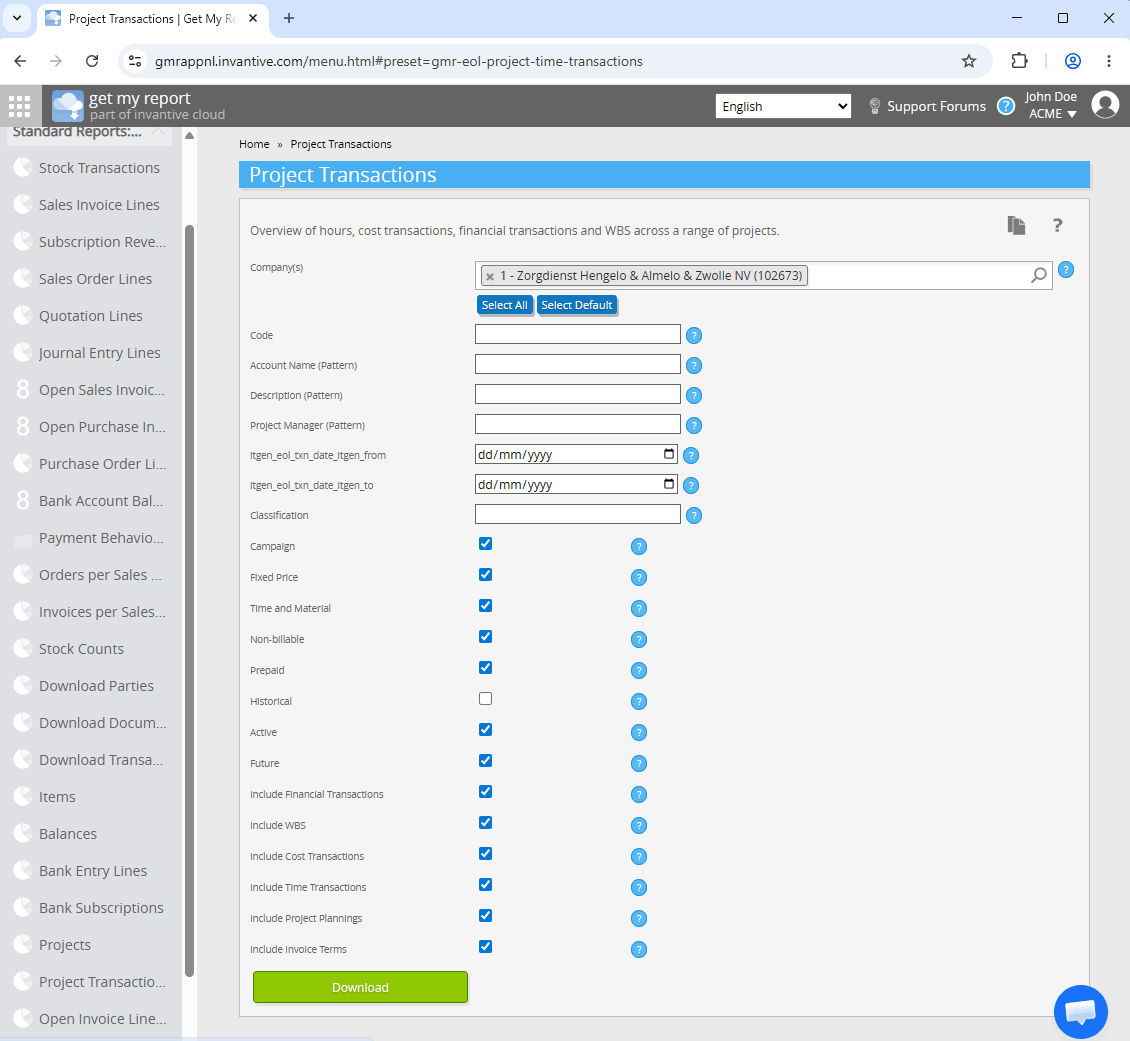
Parameters
The following parameters can be specified on this module gmr-eol-project-time-transactions:
- Exact Online company division code to be downloaded. When empty, all accessible Exact Online companies will be downloaded.
- Project code; when specified only include the project with this code.
- Account name; only include projects whose account name matches the specified pattern.
- Description; only include projects whose description matches the specified pattern.
- Project manager; only include projects whose project manager name matches the specified pattern.
- Transaction date from and to; when specified only include transactions within the date range.
- Classification; when specified only include projects with this classification.
- Campaigns; only when checked projects of type 'Campaign' will be included.
- Fixed price; only when checked projects of type 'Fixed price' will be included.
- Time & Material; only when checked projects of type 'Time & Material' will be included.
- Non-billable; only when checked projects of type 'Non-billable' will be included.
- Prepaid; only when checked projects of type 'Prepaid' will be included.
- Historic; only when checked projects which ended in the past will be included.
- Active; only when checked projects will be included with a start date before now and an end date in the future.
- Future; only when checked projects will be included with a start date in the future.
- Include Financial Transactions; when checked a worksheet with financial transactions is included.
- Include WBS; when checked a worksheet with the Work Breakdown Structure of the projects is included.
- Include Cost Transactions; when checked a worksheet with cost transactions booked directly on projects is included.
- Include Time Transactions; when checked a worksheet with time transactions (timesheets) is included.
- Include Project Plannings; when checked a worksheet with the planning of the projects is included.
- Include Invoice Terms; when checked a worksheet with the invoice terms of the projects is included.
Output
The Excel workbook has the following worksheets:
- Parameters and their values.
- Projects, including financial information.
- Time transactions (optional).
- Cost transactions (optional).
- Financial transactions (optional).
- Work Breakdown Structure (optional).
- Invoice terms (optional).
- Project plannings (optional).
Tables
The following Exact Online tables are used by this module:
- AccountsIncremental
- CostTransactionsIncremental
- Employees
- EmploymentInternalRates
- GLAccountsIncremental
- InvoiceTerms
- ItemGroups
- ItemsIncremental
- PjtTimeTransactionsIncremental
- ProjectClassifications
- ProjectPlanning
- ProjectsIncremental
- ProjectTimeTransactionHourStatuses
- ProjectTypes
- ProjectWBSIncremental
- SubscriptionsIncremental
- SystemDivisions
- TransactionLinesIncremental
- Users