Create Cost Transactions for Time on Projects
- documentation
 Invantive Get My Report for Exact Online
- updated 09-08-2026 00:00 UTC
Purpose
Create transactions in the general ledger for the costs of labour spent on project for one or more Exact Online companies.
An Excel sheet is uploaded in addition to the parameters containing the list of purchase contracts for labour.
The general ledger account for the costs is derived from the item when specified on the item and from the item group otherwise.
The transaction lines include the originating project and customer, plus a description of the employee, rate and period. Lines are costed on the date of the time transaction.
This module is typically used by controllers in professional services and production to charge the costs of hired labour to projects in the general ledger, for instance monthly for subcontractors and temporary staff.
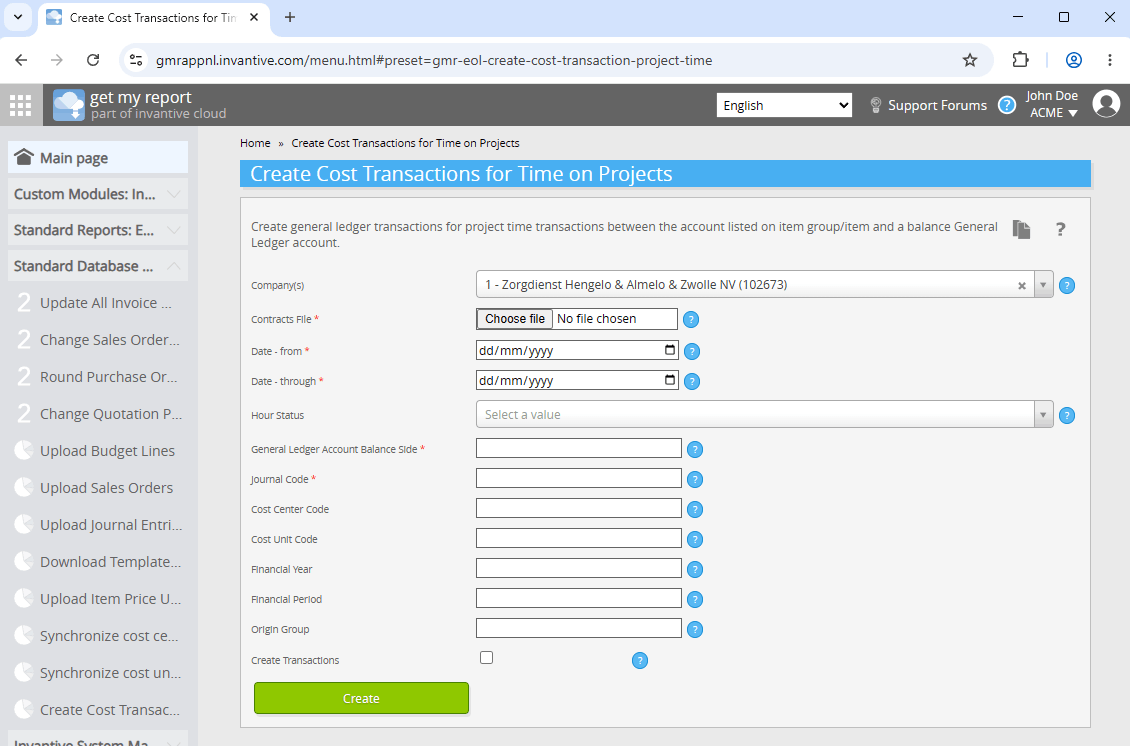
Parameters
The following parameters can be specified on this module gmr-eol-create-cost-transaction-project-time:
- Exact Online company division code(s) to be used.
- Excel workbook with purchase contracts to upload with extension 'xlsx'.
- The start and end date of the time transactions on projects to include.
- An optional filter on a specific hour status.
- The general ledger account on the balance to put the costs on.
- The journal on which to create the transactions.
- The cost centre to use.
- The cost unit to use.
- A fixed financial year and period to use.
- The original system reference to include.
- A check box to enforce creating the actual transactions. When unchecked, only a report with the cost transactions that the module would generate will be downloaded.
Excel Format
The Excel workbook must contain a second worksheet with the name 'Contracts'. A sample Excel import file is available with the following contents:
- Exact Online company specified as division code.
- The customer of the project for which the purchase contract was closed.
- The project for which the purchase contract was closed.
- The article code of the labour type.
- The number of the employee.
- The start date of the contract.
- The end date of the contract, which includes the date specified.
- The supplier to which the costs are attributed.
- The hourly rate to use.
- An optional description.
Checks
The following checks are performed before loading the data into the Exact Online companies:
- The Exact Online company's division codes must all refer to an active company the user has access to.
- The balance general ledger account specified must exist.
- The cost centre and cost unit must exist.
- The journal must exist.
Output
The output is an Excel workbook with the following worksheets:
- The parameters and their values.
- A list of the project time transactions included and whether they could be allocated to a purchase contract.
- The purchase contracts used.
- Audit log of the loading process, including whether the cost transactions have been created successfully.
Tables
The following Exact Online tables are used by this module:
- Accounts
- CostCenters
- CostUnits
- Employees
- GLAccounts
- ItemGroups
- Items
- Journals
- PjtTimeTransactions
- GLTransactions (XML API) (write: new journal entries with the cost transactions are added; existing data is not changed or deleted)
Limits
There are no limits on the number of time transactions that can be processed in one upload. However, Excel poses a limit of 1 million rows per worksheet.