Round Purchase Order Quantities
- documentation
 Invantive Get My Report for Exact Online
- updated 09-08-2026 00:00 UTC
Purpose
Changes the quantities of items on an Exact Online purchase order to the next multiple of the minimum order quantity at the supplier. For instance, when the supplier has a minimum quantity of 200 for an item, a quantity of 2.355 will be changed to 2.400.
This module is typically used by purchasing professionals in trade and production to align order quantities with the minimum order quantities of the supplier before sending the purchase order.
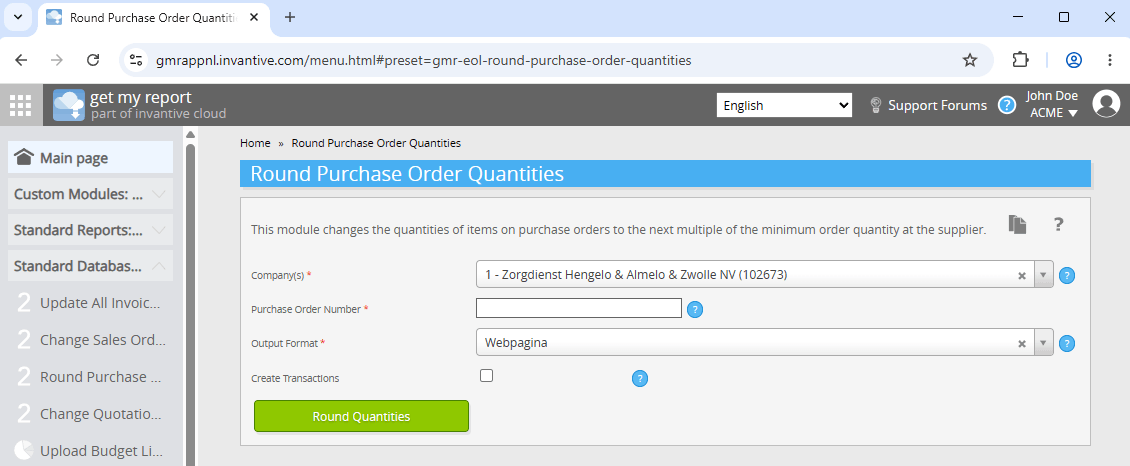
Parameters
The following parameters can be specified on this module gmr-eol-round-purchase-order-quantities:
- Exact Online company division code to be used.
- Purchase order number.
- Output format.
- A check box to enforce creating the actual changes. When unchecked, only a report with the purchase order lines that the module would change will be downloaded.
Output
The output is a web page or an Excel workbook with a list of the purchase order lines changed.
Due to limitations on Exact Online, the original purchase order lines are removed and new ones are inserted. Only lines for which the quantity needed to be changed will be handled.
To refresh the purchase in Exact Online, do not use the save button after running the round process. Due to a bug in Exact Online, this will create the original lines again. Instead use the search bar to open the updated purchase order.
Tables
The following Exact Online tables are used by this module:
- PurchaseOrders
- SupplierItems
- PurchaseOrderLines (write: lines whose quantity needs rounding are deleted and re-added with the rounded quantity, since Exact Online offers no update functionality on purchase order lines)